
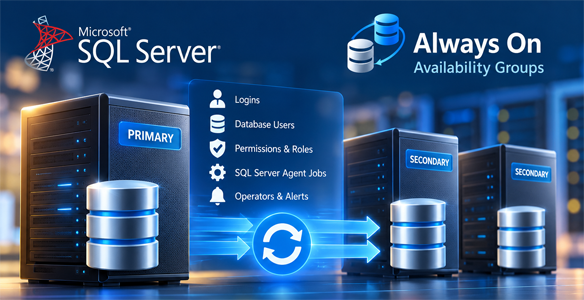
Automated SQL Server Always On instance-object synchronization
SQL Server Always On Availability Groups replicate user database data, but they do not automatically synchronize many server-level objects stored outside the availability databases. Differences in SQL Server logins, security permissions, and SQL Server Agent configuration can affect application connectivity and operational continuity after a role transition.
Invoke-AOAGObjectsSync.ps1 (version 1.0) is a PowerShell utility that discovers SQL Server instances installed on the local Windows server, identifies their Availability Group topology, and compares supported instance objects between the local PRIMARY replica and its SECONDARY replicas. It applies changes to secondary instances when supported objects are missing or differ from the primary configuration.
The script supports two synchronization modes: SyncLogin for logins, user mappings, roles, and permissions; and SyncAll for the same security objects plus SQL Server Agent operators, jobs, and alerts. A separate -Discover switch inspects the environment without applying synchronization changes.
The automation covers
- Automatic discovery of default and named SQL Server Database Engine instances installed on the local server.
- Availability Group topology detection, including local replica role, PRIMARY replica, listener name, and port.
- Primary-to-secondary comparison of supported SQL Server instance objects.
- Synchronization of missing logins and differences in SQL login SIDs, password hashes, and applicable login properties.
- Validation of database-user mappings in Availability Group databases, without attempting to modify AG databases on secondary replicas.
- Synchronization of eligible user mappings and database-role memberships in local, writable, non-AG databases when a matching database exists on the destination.
- Synchronization of server roles, server-level permissions, and relevant local-database permissions for managed logins.
- Synchronization of SQL Server Agent operators, jobs, and alerts in SyncAll mode.
- Object exclusions, post-synchronization verification, and detailed execution logging.
Key capabilities
- Multi-instance discovery: Detects locally installed SQL Server instances from the Windows registry, resolves connection targets, and inspects the Availability Group topology of reachable instances.
- Primary-driven synchronization: Processes Availability Groups for which the local replica is PRIMARY; skips locally discovered groups in other roles and avoids processing the same group twice.
- Login consistency: Compares login types, SIDs, SQL login password hashes, enabled/disabled state, default database, default language, and supported password-policy settings.
- Database-user mapping awareness: Validates AG database principals when the secondary database is readable; reports SID-only validation when it is not readable. Handles eligible user mappings in matching local databases separately.
- Security permission alignment: Detects differences in managed-login permissions and selectively invokes permission synchronization for affected logins, then checks for remaining drift.
- SQL Server Agent configuration: Compares and synchronizes operators, job definitions, and alert definitions; performs post-sync verification and handles supported alert renaming and stale duplicate cleanup.
- Execution control: Provides SyncLogin, SyncAll, -Discover, inventory verbosity control, and optional login/operator/job/alert exclusions.
- Execution reporting: Appends timestamped messages to a local log and reports the number of changes, execution errors, and any residual permission drift.
Synchronization modes
- Discover: Inventory locally installed SQL instances and Availability Group topology without making synchronization changes.
- SyncLogin: Synchronize eligible logins, user mappings, server roles, and permissions from the local PRIMARY to the corresponding SECONDARY replicas.
- SyncAll: Perform SyncLogin operations and additionally synchronize SQL Server Agent operators, jobs, and alerts. This is the default mode.
- ShowInventoryDetails: Control detailed inventory and diagnostic console output; final results and errors remain visible.
PowerShell functions – discovery and security
- Get-LocalSqlInstances – Discovers local SQL Server instances and their connection targets.
- Get-LocalInstanceTopology – Reads local Availability Group topology and identifies the current replica role.
- Invoke-AOAGObjectSync – Coordinates synchronization from the identified PRIMARY to its SECONDARY replicas.
- Get-LoginInventory / Get-LoginDifferences – Collect and compare managed SQL and Windows login metadata.
- Set-SqlLoginPasswordHash / Set-LoginProperties – Apply supported SQL login password and property changes on destination instances.
- Get-UserMappingInventory / Sync-UserMappings – Inventory and validate AG mappings, and synchronize eligible mappings in matching writable local databases.
- Get-LoginPermissionInventory / Get-LoginPermissionDifferenceNames – Inventory and identify server- and database-permission drift.
- Ensure-DatabaseRoleReady – Prepares required database roles and related role metadata for eligible local-database mapping synchronization.
PowerShell functions – SQL Server Agent
- Get-AgentOperatorFingerprint – Builds comparison data for SQL Server Agent operators.
- Get-AgentJobDefinitionInventory / Sync-AgentJobs – Compare SQL Server Agent job definitions, copy missing jobs, update differing jobs, and verify the results.
- Get-AgentAlertDefinitionInventory / Get-AgentAlertDefinitionDiff – Compare SQL Server Agent alert definitions.
- Resolve-AgentAlertNames – Resolve supported alert name changes and remove matching stale duplicate alerts under the script's defined conditions.
- Sync-AgentAlertNative – Apply supported SQL Server Agent alert definitions to secondary instances.
Requirements and prerequisites
- Windows PowerShell on the Windows server hosting the local PRIMARY SQL Server instance.
- The dbatools PowerShell module, version 1.1.145 or later.
- Reachable SQL Server PRIMARY and SECONDARY replica instances and a functioning Always On Availability Group topology.
- Windows credentials with sufficient access to inspect SQL Server topology, read the relevant login and SQL Agent metadata, and apply the requested secondary-instance changes.
- Sufficient SQL Server privileges for login and permission management, database-user mappings, and, in SyncAll mode, SQL Server Agent objects.
- For SQL Server Agent object synchronization, SQL Server Agent and the relevant msdb configuration must be available on the participating instances.
Configuration and execution
- Run the script on a Windows server hosting the PRIMARY replica for each Availability Group to be synchronized. When the local replica is not PRIMARY, the script skips that group.
- Use .\Invoke-AOAGObjectsSync.ps1 -Discover to review local SQL instances and Availability Group topology before making changes.
- Use .\Invoke-AOAGObjectsSync.ps1 -SyncMode SyncLogin to synchronize supported security objects only.
- Use .\Invoke-AOAGObjectsSync.ps1 -SyncMode SyncAll to synchronize supported security and SQL Server Agent objects.
- Edit the optional $ExcludeLogins, $ExcludeOperators, $ExcludeJobs, and $ExcludeAlerts arrays in the script to exclude specified objects from their respective synchronization scopes.
- Use -ShowInventoryDetails:$false when detailed inventory output is not required.
- Review the execution messages and the Invoke-AOAGObjectsSync.log file created alongside the script for changes, errors, and residual permission differences.
Important operational considerations
The utility changes SQL Server instance configuration on SECONDARY replicas. When a login type or SID differs, it can recreate the destination login using Copy-DbaLogin -Force; it can also change SQL login password hashes, role memberships, database-user mappings in eligible local databases, and SQL Server Agent definitions. The alert synchronization workflow can remove a stale secondary-only duplicate alert when its defined matching conditions are met. Review exclusions and execute under an approved change procedure.
Availability Group user databases are not copied or altered by this tool. Their users and database-level security metadata are carried by the availability database itself; the script validates relevant mappings on secondaries when the database is readable. Non-AG databases are not replicated by this utility, although eligible user mappings in an existing matching local database can be synchronized.
A successful synchronization run does not guarantee that every secondary is identical in every respect: the script operates on its defined object scope, and any skipped operations or residual permission drift should be reviewed in the execution log. This utility does not create Availability Groups or perform failover.
